On this page: Background and Purpose | Authoring Considerations | WCAG Requirement | Instructions | Headers and Footers | References and Footnotes | Guidelines and Standards

Reading Order (Meaningful Sequence)
Applicable in both Word and PowerPoint.
Note: The checkpoints, in CommonLook Office, are handled differently depending on the source application.
Background and Purpose
Perhaps one of the most basic requirements in document accessibility is that content is arranged, and tagged in the PDF, such that when read (either visually or with assistive technology), the order in which the content is presented is logical.
To paraphrase the WCAG requirement, “If the sequence in which content is presented affects its meaning, a correct reading sequence must be able to be programmatically determined.”
The Purpose of this checkpoint is to ensure that the content in the PDF will be read by assistive technology in the same logical sequence that the author has intended.
Authoring Considerations:
Arrange your content on the page (or the PowerPoint slides) so it logically makes sense. A good guideline to use (for languages that read from left to right) is to arrange the content from left to right and from top to bottom on the page.
Furthermore, if you want to arrange content on the page in columns, for example, use the column functionality in Word or PowerPoint instead of trying to manually adjust the formatting.
WCAG Requirement:
When the order in which content is presented affects its meaning, the correct reading order must be “programmatically determinable.”
For more information from the W3C
Refer to the W3C webpage on Understanding Success Criteria 1.3.2.
This is a Level A success criteria.
Instructions
In Word
CommonLook Office automatically creates PDF documents that are properly tagged and ordered, based on the structure of the document as created in Word. For further guidance in authoring “best practices,” follow the link in the CommonLook Office ribbon for “Guidelines for Accessible Word Documents.”

Note: When in PowerPoint, there is a similar button in the ribbon labeled “Guidelines for Accessible PowerPoint Presentations.”
In PowerPoint
When running CommonLook Office in PowerPoint, you’ll need to manually verify, and possibly adjust, the reading order for your slides.
- When CommonLook Office opens, on the left, CommonLook Office will list all of the slides in the presentation.
- For each slide, navigate through the elements listed and verify they are in the correct order.
- Select an element on a slide and then use the “Down” or “Up” buttons, below the list of elements, to move the element up or down in the reading order, as needed.
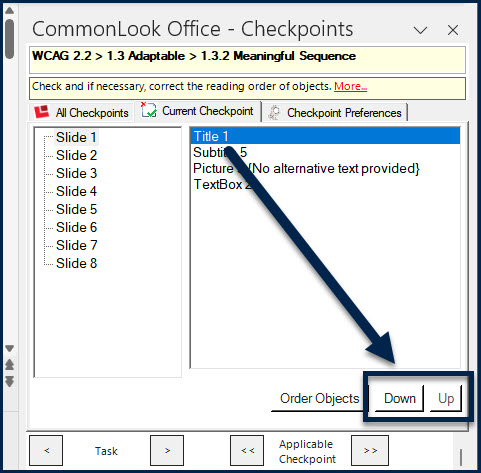
- Use the “Order Objects” button to have CommonLook Office automatically order the elements on the slide from top-to-bottom and left-to-right.
Caution! If you use the “Order Objects” button, we still recommend you verify the order is what you intended.
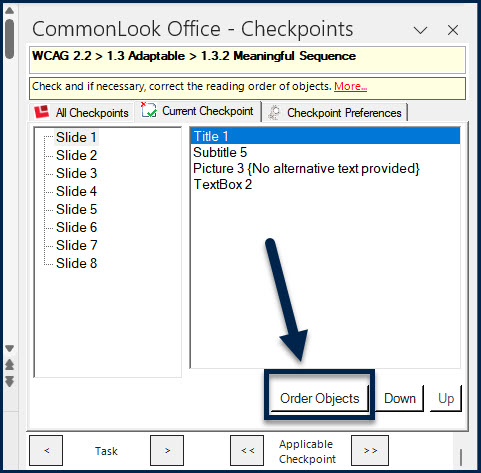
- Use the “Order Objects” button to have CommonLook Office automatically order the elements on the slide from top-to-bottom and left-to-right.
Headers and Footers
CommonLook Office will automatically artifact content in the header and/or footer sections of Word documents and PowerPoint slides. As a result, this content will not be read by assistive technology. If header or footer content should be read, move it to a logical place in the document so that it is included in the tagged content.
Important: If you have links in your footers, you’ll need to move the links out of the footers OR remove the hyperlinks because you’re not allowed to have untagged annotations in a PDF!
References and Footnotes
When working with Word documents, CommonLook Office will automatically detect and tag references and footnotes.
PowerPoint does not include the functionality for creating references and footnotes that Word does. When creating references and footnotes manually, be sure to check the reading order of these elements as well. In addition, check the PDF to make sure that references and footnotes have been properly tagged.
Guidelines and Standards
This checkpoint is relevant to the following regulations, guidelines, and standards:
| Document | Published | Scope | Conformance Criteria |
|---|---|---|---|
| W3C WCAG 2.0 (REVISED SECTION 508 – 2017) |
2008 | Web Content | 1.3.2 |
| W3C WCAG 2.2 | 2023 | Web Content | 1.3.2 |
| Health and Human Services – HHS (USA) | 2008 | HHS 508 PDF Checklist | 3.1, 3.2 |
| Health and Human Services – HHS (USA) | 2021 | HHS 508 PDF Checklist | 4A, 4B, 4Q, 4R,4T, 9B, 9C |
| ISO 14289-1 (PDF/UA-1) | 2012 | PDF Technology | 7.1, 7.2, 7.8, 7.9 |
| ISO 14289-2 (PDF/UA-2) | 2024 | PDF Technology | 8.2.2, 8.2.3, 8.2.5.14, 8.3 |