On this page: Background and Purpose | Authoring Considerations | WCAG Requirement | HHS Requirement | What CommonLook Office Does | Guidelines and Standards

Contrast Minimum
Applicable to both Word and PowerPoint.
Background and Purpose
Authors need to be sure that there is sufficient contrast between the foreground and the background of their content. Without sufficient contrast, people who are visually impaired may have a very difficult time seeing the content in a document.
The purpose of this checkpoint is to verify that there is sufficient contrast between the content and the background of the document.
Authoring Considerations:
Make sure that the contrast ratio between the text on the page and any background, shading, text on top of images, etc., is sufficient enough so people will be able to easily see and read the text.
Important notes:
- The contrast ratios provided are minimums. It is perfectly acceptable, and even advisable, to have even greater contrast ratios than specified below.
- The standards do not allow for “rounding.” So, for example, if the requirement is 4.5:1, and your measurement is 4.4999:1, you are not in compliance with the stated requirement.
WCAG Requirement:
WCAG 2.0, 2.1, and 2.2 all require a contrast ratio of 4.5:1, with some exceptions.
Exceptions:
- “Large text” (or images of large text), only needs a contrast ratio of 3:1. “Large text” is defined as:
- Text that is 18-point font, OR
- Text that is 14-point font and
- Text (or images of text) that are part of an inactive user interface component, that are purely decorative, that are not visible to anyone, or that are part of a picture containing other significant visual content. In these cases, there is no contrast requirement.
- Text that is part of a logo does not have a contrast requirement.
For more information from the W3C
Refer to the W3C webpage on Understanding Success Criteria 1.4.3.
This is a Level AA success criteria.
HHS Requirement
The HHS (U.S. Department of Health and Human Services) requires contrast ratios to be 4.5:1 for all text and images of text.
What CommonLook Office Does
IMPORTANT NOTE regarding version 2.1.18 and later
For performance reasons, the ability to turn on or off the contrast checkpoint has been moved into User Preferences. You can turn on or off the contract check by navigating to “CommonLook Office Preferences” in the ribbon.
By default, the contrast check has been turned OFF.
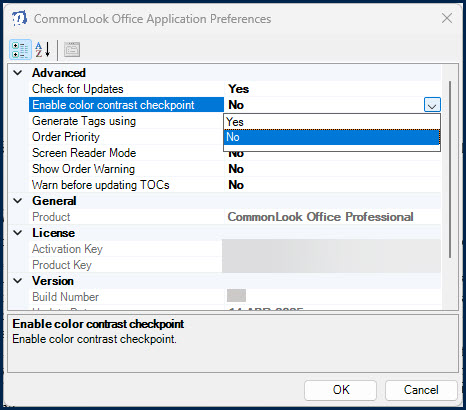
To turn the contrast checkpoint ON, open the Preferences dialog box, expand the menu next to “Enable color contrast checkpoint” and set it to “Yes.” Then, select “Ok” at the bottom of the dialog box.
With the contrast checkpoint turned on:
CommonLook Office checks the document’s text against the background for a 4.5:1 contrast ratio. If there are potential contrast issues, CommonLook Office lists the elements in question.
Note: CommonLook Office is looking at the text colors to determine contrast. It is not taking into account exceptions such as those for “Images of text” or “Large text.”
Tip: To test for contrast ratios, we recommend using the WebAIM contrast checker. It’s free, easy to use, and provides clear passing and failing results!
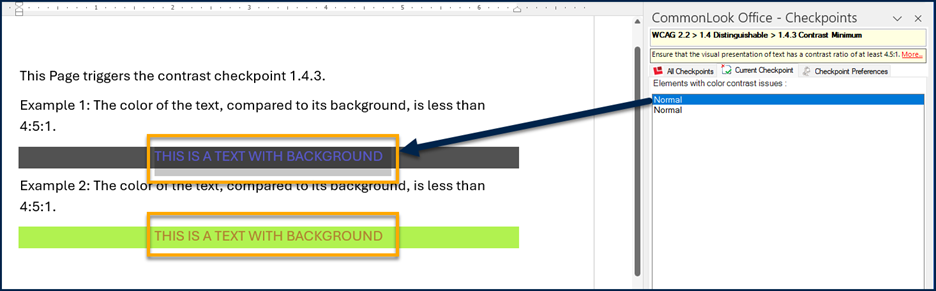
In the screenshot below, there are two portions of text, each in a different color,on shaded backgrounds. In the CommonLook Office panel, there are two “Normal” elements listed. (They are listed as “Normal” as that’s the Style assigned to them in Word.) The first element is selected and the text in question is highlighted on the page.
Guidelines and Standards
This checkpoint is relevant to the following regulations, guidelines, and standards:
| Document | Published | Scope | Conformance Criteria |
|---|---|---|---|
| W3C WCAG 2.0 (Revised Section 508 – 2017) |
2008 | Web Content | 1.4.3 |
| W3C WCAG 2.2 | 2023 | Web Content | 1.4.3 |
| Health and Human Services – HHS (USA) | 2008 | HHS 508 PDF Checklist | 1.13 |
| Health and Human Services – HHS (USA) | 2021 | HHS 508 PDF Checklist | 5E |
| ISO 14289-1 (PDF/UA-1) | 2012 | PDF Technology | This is an authoring consideration not covered in PDF/UA. |
| ISO 14289-2 (PDF/UA-2) | 2024 | PDF Technology | This is an authoring consideration not covered in PDF/UA. |