On this page: Background and Purpose | Authoring Considerations | WCAG Requirement | Instructions | Guidelines and Standards

Overlapping Objects
Applicable to both Word and PowerPoint.
Background and Purpose
When objects overlap, they may present ambiguities to the authoring software with unpredictable results in the output PDF file. In addition, if the overlapping objects hide content, not only can important information be missed but this can also create reflow problems in the generated PDF as well.
The Purpose of this checkpoint is to check each instance of overlapping objects, ensuring content is not hidden.
Authoring Considerations:
Make sure content does not hide other content.
WCAG Requirement:
While this checkpoint does not have a directly related WCAG Success Criteria, Guideline 3.1 requires that text content is readable and understandable. Clearly, if content is hidden below other content, this would be a violation.
Instructions
When this checkpoint is run, CommonLook Office lists elements or objects that overlap.
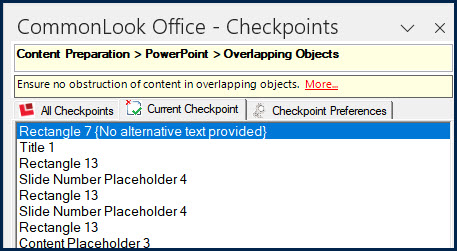
- Select the first object in the list.
- In the physical view, verify that no content is hidden by that object.
- If content is hidden, choose, as appropriate, from the following options:
- Close CommonLook Office and change the design so content is not hidden,
- Group the objects (if possible and contextually appropriate). Each group will have a single tag in the output PDF.
Note: If using Word, grouping objects needs to be done in Word. If using PowerPoint, you may be able to group objects in checkpoint “1.3.1 – Information and Relationships – Grouping.” - Leave the design as it is. In this case, however, errors may occur. For example, some content belonging to one object may be tagged with another. Or some content may become hidden in the physical view of the document but will still be read by assistive technologies.
- Reopen CommonLook Office (if needed) and repeat the steps as needed for other overlapping objects.
Note: It is highly recommended that overlapping objects be grouped and that Alternative text is provided for the group as a whole. Also, ensure that the reading order is correct. Refer to checkpoint “1.3.2 Meaningful Sequence” as needed.
Key Tip: When objects are hidden behind other objects, the PDF may not be generated correctly. If accepted in the checkpoint, be sure to check the final PDF output.
Guidelines and Standards
This checkpoint is relevant to the following regulations, guidelines, and standards:
| Document | Published | Scope | Conformance Criteria |
|---|---|---|---|
| W3C WCAG 2.0 (REVISED SECTION 508 – 2017) |
2008 | Web Content | 1.3.2 |
| W3C WCAG 2.2 | 2023 | Web Content | 1.3.2 |
| Health and Human Services – HHS (USA) | 2008 | HHS 508 PDF Checklist | Not specifically stated |
| Health and Human Services – HHS (USA) | 2021 | HHS 508 PDF Checklist | 4Q, 5F |
| ISO 14289-1 (PDF/UA-1) | 2014 | PDF Technology | 7.1 |
| ISO 14289-2 (PDF/UA-2) | 2024 | PDF Technology | 8.2.3 |